
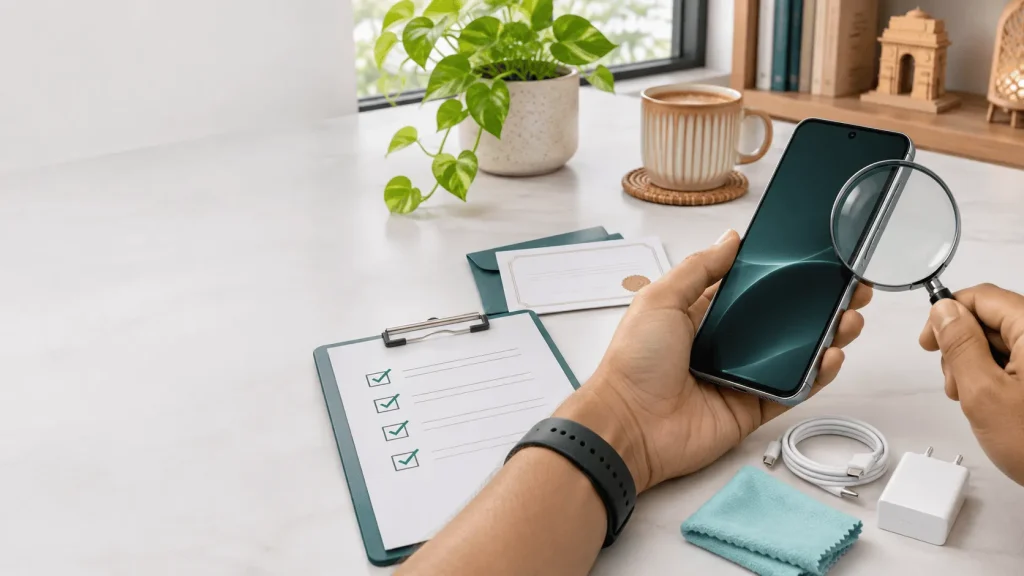
Reviewed: November 2026
Quick answer: Is buying a refurbished phone safe in India?
- The short answer: Yes. Buying a refurbished phone in India is safe when you use an organised platform that provides testing, data-wiping, transparent condition grading, account-lock clearance, invoice and warranty support.
- The 5-point verification: Check device identity, account-lock status, functional testing, cosmetic condition and after-sales terms before paying.
- The biggest risk: the seller, not the device. Avoid grey-market listings that refuse an invoice, hide inspection details or force payment outside a trusted checkout.
A refurbished phone can be a sensible way to get better hardware without paying the price of a brand-new flagship. It can also be a poor purchase when the seller hides the device history, uses vague condition language or offers no practical remedy after delivery.
This guide explains how to tell the difference. Use it before buying a refurbished iPhone, Samsung Galaxy, Google Pixel, OnePlus, Xiaomi, Motorola or any other smartphone in India.
Start with Budli’s live information: Browse certified refurbished mobiles, read the certification and condition details, and check the applicable warranty and returns terms on the individual product page.
How to Tell if a Refurbished Phone Is Safe to Buy
Safety comes from a verifiable process. A trustworthy seller should be able to explain what was checked, how the device condition is described, whether account locks have been cleared, and what happens if the phone develops a covered problem.
| Safety factor | Proof to look for | Why it matters |
|---|---|---|
| Device identity | Model, storage, variant and IMEI information | Prevents surprises about the exact phone you are buying |
| Account clearance | iCloud/Activation Lock or Android Google-account/FRP clearance | A locked phone may become unusable |
| Functional testing | Display, touch, cameras, audio, charging, connectivity and biometrics | Finds faults that are easy to miss in a product title |
| Condition description | Published criteria, defect notes and product images | Explains why one unit costs less than another |
| After-sales protection | Invoice, warranty eligibility, return window and support contact | Gives you a path if something goes wrong |
Refurbished vs second-hand: What Is the Difference?
“Second-hand” only tells you that a phone had a previous owner. “Refurbished” should describe a more controlled preparation process, but the exact meaning depends on the seller. Always judge the process and documentation, not the label alone.
| Buying route | What you normally know | Buyer responsibility |
|---|---|---|
| New | New-device warranty and retail documentation | Check seller authenticity and applicable warranty |
| Second-hand | Usually depends on what the individual seller tells you | Inspect the phone, ownership trail, locks and payment risk |
| Refurbished | Should include testing, condition information and after-sales terms | Read the exact listing and policy instead of assuming every unit is identical |
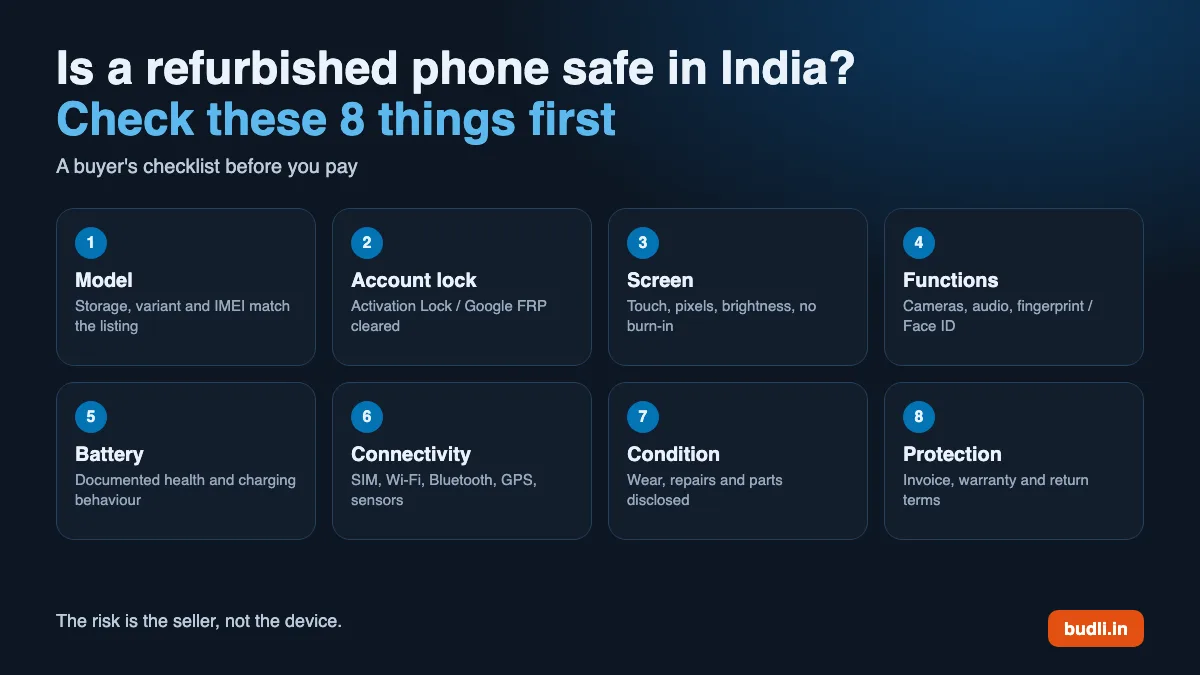
8 Essential Checks Before Buying a Refurbished Phone in India
Storage, variant and IMEI
Apple or Google clearance
Touch, pixels and brightness
Camera, audio and biometrics
Health and charging behaviour
SIM, Wi-Fi and Bluetooth
Wear, repairs and parts
Invoice, warranty and returns
Check the exact model, storage and network variant
Confirm the model name, storage capacity, colour, SIM configuration and network compatibility. For imported or older models, check whether the phone supports the bands, VoLTE and 5G services you use in India. Do not rely only on the product title: compare the listing details with the model information shown on the device.
Confirm that account locks are cleared
On an iPhone, Activation Lock and the previous owner’s Apple account must be removed. Apple’s Activation Lock guide explains why a previous account can prevent reactivation. On Android, the previous Google account must be removed so Factory Reset Protection does not block setup. Check this during setup and stop if the phone asks for someone else’s credentials.
Inspect the screen and touch response
Test the entire display, not just the centre. Look for lines, bright or dark spots, uneven brightness, burn-in, glass cracks, lifting edges and areas where touch does not register. Open a plain white screen and a dark screen, then type across the keyboard and drag icons from corner to corner.
Test cameras, microphones, speakers and biometrics
Take photos with every camera, record a short video, play audio through the speakers, make a test call, record a voice note and check the fingerprint sensor or Face ID where applicable. These checks matter because a phone may look perfect while a microphone, camera focus or biometric sensor is unreliable.
Check battery information and charging behaviour
Battery information differs by model. iPhones may show Maximum Capacity and Parts and Service History, while many Android phones show battery information through diagnostics or seller notes. Do not assume that every refurbished phone comes with a universal 80% or 85% battery-health guarantee; ask what is documented for the specific unit and how the price reflects its condition. Test wired charging, inspect the port and watch for unusual heat, rapid percentage drops or charging that repeatedly disconnects.
Verify connectivity and sensors
Insert a SIM or complete the seller’s permitted network check. Test Wi-Fi, Bluetooth, GPS, mobile data, vibration, proximity sensor and auto-brightness. If you use UPI, navigation, hotspot or work apps every day, test those workflows before the return period expires.
Read condition and part information carefully
Cosmetic condition is not the same as functional condition. A phone can have visible surface wear and still work correctly, while a clean-looking phone can have a hidden issue. Read the seller’s published condition description, inspect actual product images and check whether repair or part information is disclosed.
Check the invoice, warranty and return terms before payment
Do not treat a warranty badge as enough. Read what is covered, how long it lasts, who handles service, what the exclusions are and whether the product is eligible for return. Keep the invoice, packaging and delivery record until you are satisfied with the phone.
Want the checks already done? Every Budli Certified phone goes through a 25-point inspection, with condition notes and warranty details on the product page.
Browse refurbished iPhones Browse refurbished Samsung phonesRed flags: walk away when the evidence is missing
- The seller will not confirm account-lock clearance.
- The condition is described only as “excellent” with no criteria or photos.
- The phone is much cheaper but there is no invoice, support route or return policy.
- You are asked to transfer money privately or continue the conversation outside the trusted checkout.
- The seller cannot explain battery, repair or compatibility information relevant to that model.
What Budli’s certification process adds
Budli’s live certification page says Budli Certified devices undergo a 25-point inspection, with up to 12 months of warranty on eligible products; the individual product page and invoice show the exact cover, plus 7-day returns as per policy. The process is intended to reduce the guesswork involved in buying a pre-owned device.
What to confirm on the individual listing
- The published condition description and actual product photos.
- Model, storage, connectivity and accessory details.
- Battery notes or available battery-health information.
- Warranty eligibility and service duration.
- Return eligibility, exclusions and the process for raising an issue.
- Invoice and support details.
Read Budli’s certification and grading process before comparing products.
Quick watch: a short visual guide to the checks that make a refurbished phone safer to buy.
 Watch the safety checks on YouTube
What to do when the phone arrives
Use the return window as an inspection period, not as a reason to delay testing. Record the unboxing if possible, compare the phone with the listing and complete the following checks on the first day:
| First-day check | What to do |
|---|---|
| Identity | Match model, storage, serial/IMEI details and the invoice. |
| Physical condition | Compare marks, dents, screen condition and accessories with the listing. |
| Core functions | Test SIM, Wi-Fi, Bluetooth, cameras, audio, charging, biometrics and sensors. |
| Accounts | Complete setup with your own Apple or Google account. Do not accept a previous-owner lock. |
| Documentation | Save the invoice and note how to contact support before the return period ends. |
Upgrading? Sell your old phone first. Get an instant quote and free pickup before choosing your next device.
Get an instant quoteIs buying a refurbished iPhone safe?
It can be, but iPhones need a few additional checks. Confirm that Activation Lock is removed, Face ID or Touch ID works, the battery information is visible where expected, and Parts and Service History does not show an unexplained warning. Compare the model and storage with the listing, and read the condition and warranty terms before paying.
For model-specific checks, use Budli’s read our refurbished iPhone buying guide and the detailed guide to refurbished iPhone battery health in India.
Is buying a refurbished Samsung or Android phone safe?
Yes, the same safety principles apply, with additional attention to Google-account removal, Factory Reset Protection, charging behaviour, fingerprint sensors, display condition and network compatibility. Samsung buyers can use Budli’s Samsung buying guide for model-specific checks. For foldables, inspect hinge movement and the inner display using the refurbished foldable-phone guide.
Useful guides before you decide
Compare phones by use case, budget and condition. Refurbished vs second-hand
Understand testing, documentation and buyer risk. Refurbished-phone myths
Separate common assumptions from practical checks. Buy certified refurbished mobiles
Compare current products and listing details.
The practical answer
A refurbished phone is a safe purchase when the seller makes the important facts visible and gives you a reasonable remedy if the device does not match the listing. Compare the process, not just the discount.
Frequently asked questions
Is a refurbished phone safe for daily use?
It can be safe for daily use when the device passes functional checks, has no account lock, matches the listing and comes with clear warranty and return terms. Test calls, mobile data, charging, cameras and biometrics before the return window ends.
Is refurbished the same as used?
No. Used or second-hand describes ownership history. Refurbished should indicate that the device has been inspected and prepared for resale, but the exact process varies by seller. Ask for the testing and condition details.
Do refurbished phones have original parts?
Not necessarily. Parts history depends on the device and seller. Read the listing for repair or part information and focus on whether the phone works correctly, is accurately described and is covered by the applicable policy.
How do I check if a refurbished phone is stolen or locked?
Check the IMEI and invoice details, confirm that Apple Activation Lock or Android Factory Reset Protection is cleared, and complete setup with your own account. Do not accept a phone that asks for a previous owner’s credentials. You can also use the official Sanchar Saathi CEIR IMEI check before buying.
What warranty does a refurbished phone usually have?
Warranty length and coverage vary by seller, category and product. Budli’s current certification information describes up to 12 months of warranty on eligible products. The individual product page and invoice should be treated as the final reference.
Can I return a refurbished phone if there is a problem?
Return eligibility depends on the seller’s current policy and the product’s conditions. Budli’s certification page currently describes 7-day returns, subject to policy. Read the shipping and returns page before buying and keep the delivery record.
Should I buy a refurbished phone online or from a local shop?
Either route can work, but an online seller is safer when it publishes product details, provides an invoice, explains warranty and returns, and gives you a support route. A local shop is safer when you can inspect the device and obtain the same documentation in writing.
What should I do if the phone does not match the listing?
Document the issue with photos or video, stop using the device if there is a safety concern, keep the packaging and invoice, and contact the seller through the documented support route within the policy window.